
A Scribe alternative for Mac that you pay for once
Stepfinch does what Scribe does: you do a task once and get a step-by-step guide with screenshots. It runs on your Mac, records desktop apps on every plan, and costs $39 once.
Updated November 22, 2026
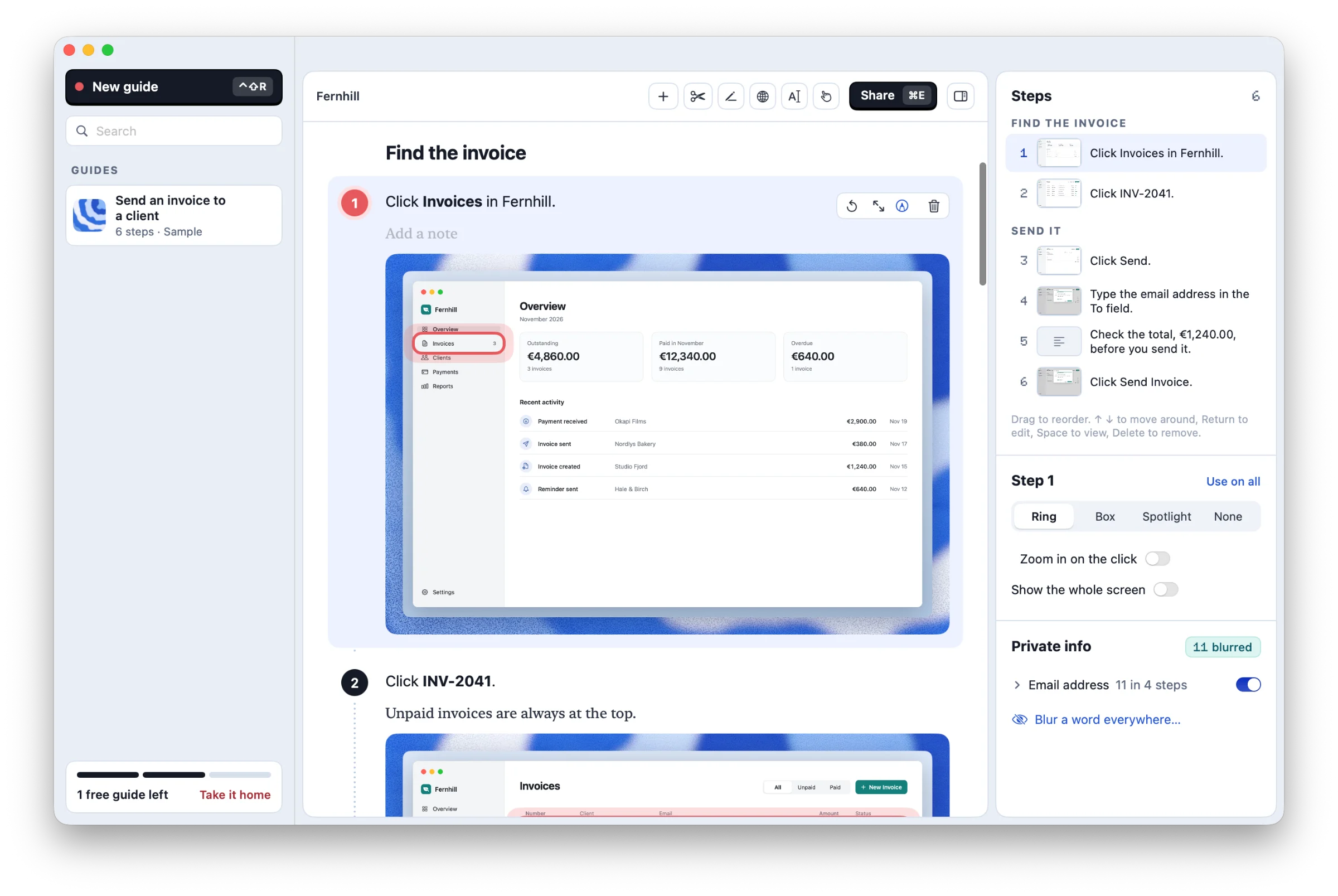
Scribe is a good product. It made “record a task, get a guide” popular, and it’s strong for teams who want a shared library in the cloud. But a lot of people look for something else, and the reasons are usually the same four.
Why people look for a Scribe alternative
- The subscription. Pro Personal is $25 to $35 a month for one person. Pro Team is $13 to $17 per person a month and starts at 5 seats. That’s $900 or more over three years for one person.
- The desktop app is a paid feature. On the free plan, Scribe records in the browser only. Excel, Finder, QuickBooks or any other desktop app needs Pro.
- Automatic blur is Enterprise only. Pro can redact by hand. Scribe’s automatic redaction of personal data is on the Enterprise plan, and so is translation.
- Your guides live in their cloud. Screenshots of client accounts and internal tools sit on someone else’s servers.
Stepfinch and Scribe side by side
| Stepfinch | Scribe | |
|---|---|---|
| Price for one person | $39 once | $25–35 a month |
| Three years | $39 | $900–1,260 |
| Free plan | 3 guides, every feature | Up to 10 guides, browser only |
| Records desktop apps | Yes, on every plan | Pro and Enterprise |
| Blurs private info by itself | Yes | Enterprise |
| Translates guides | Yes, on your Mac | Enterprise |
| PDF, HTML, Markdown export | Yes, plus Word, PowerPoint, GIF and video | Pro and Enterprise |
| Where guides are kept | Your Mac | Scribe’s cloud |
| Windows | Not yet | Yes |
Scribe’s prices and plans are from scribe.com/pricing on November 22, 2026. The lower price in each range is for paying yearly.
How Stepfinch works
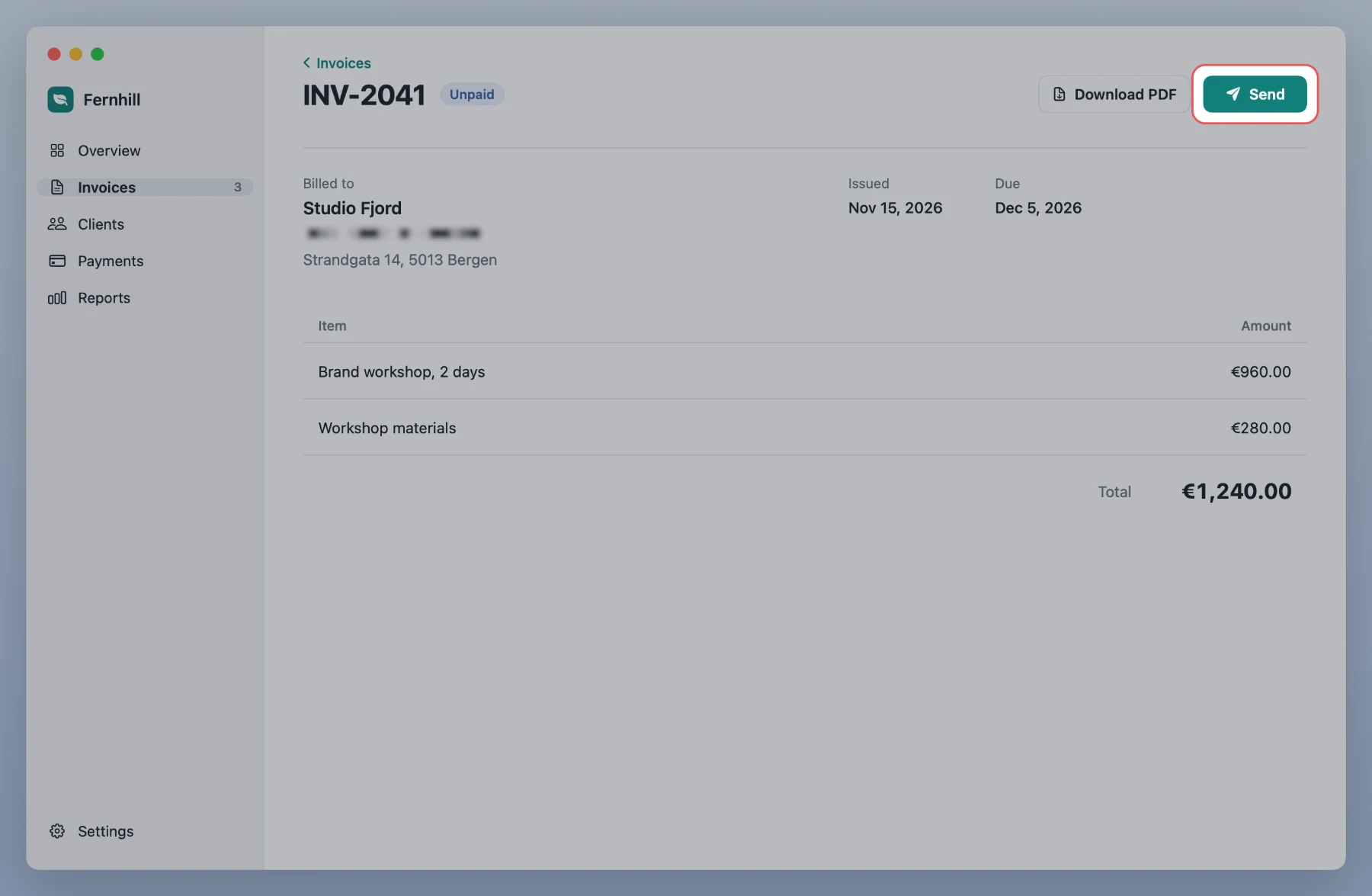
Press ⌃⇧R and do the task in any app. Every click becomes a step with a screenshot and a ring on what you clicked. The step text is written from the button’s own name, like “Click Send Invoice”. Typing becomes “Type … in the To field”, and menus become “Choose File › Export To › PDF…”.
Emails, phone numbers, card numbers, bank accounts and API keys are blurred in every screenshot before you share. Then you export a PDF, a Word file, a web page, a click-through walkthrough or a video.
When Scribe is the better choice
- You’re on Windows, or your team mixes Windows and Mac. Stepfinch is Mac only for now.
- You want one cloud library with shared editing, comments and single sign-on for a large team.
- You only work in the browser and 10 guides is enough. Scribe’s free plan covers that.
Other Scribe alternatives
- Tango: similar to Scribe, browser first, $22 to $30 a month per person. See Scribe vs Tango and Tango alternatives.
- Folge: a desktop app for Mac and Windows that you pay for once ($89 for one platform and one computer). AI writing needs your own OpenAI or Claude key, and blur is by hand. See Folge vs Stepfinch.
- Snagit: a screenshot tool with a Step Capture feature, sold as a $39-a-year subscription. See Snagit alternatives for Mac.
- Stepfinch: built only for the Mac, $39 once, writing and blur done on your Mac.
Questions
Is there a free alternative to Scribe?
Stepfinch’s first 3 guides are free, with every feature, including desktop apps, auto-blur and PDF export. Scribe’s own Basic plan is free too, for up to 10 guides in the browser.
Does Scribe have a Mac app?
Yes, but Scribe’s FAQ says the desktop app is a Pro and Enterprise feature. On the free plan, Scribe records in your browser only.
Can I move my Scribe guides to Stepfinch?
There’s no import. Most people keep old guides where they are and record new ones in Stepfinch. Recording a guide again takes as long as doing the task once.
Does Stepfinch send my screenshots to an AI service?
No. The step text is read from the screen, and the optional title, intro and tidy-up use Apple’s on-device model. Nothing leaves your Mac.
Does Stepfinch work on Windows?
Not yet. It’s built only for the Mac. There’s a Windows waitlist on the home page.