
How to create a training manual
A training manual is what a new person reads so you don’t have to explain everything twice. Here’s the format that works, a template to copy, and the fastest way to write the software parts.
By Telman Gadimov, who makes Stepfinch · Updated November 22, 2026 · 3 min read
What a training manual is for
A training manual answers the questions a new person would otherwise ask you: what do I do, in which tool, in what order, and who do I ask when it goes wrong. A good one lets someone do real work in their first week without sitting next to you.
Most of a modern training manual is procedures: how to do each task in the software the job uses. That’s also the part that takes longest to write.
The training manual format that works
- Cover and contents. The role it’s for, the date, and a list of sections.
- Start here. Who’s who, how the week works, and how to use this manual.
- Tools and accounts. Every app they’ll use, how to get access, and what each is for.
- Procedures. One per task, in the order they’ll need them. Numbered steps, a screenshot each.
- First-week checklist. The tasks to try, with the procedure for each.
- When something goes wrong. Common problems, and who to ask.
- Glossary. Your team’s words and abbreviations.
How to create a training manual in 7 steps
- List what the new person will do. Write every task from their first month on a page. Not what the job is in theory, what they’ll actually do on Tuesday.
- Put the tasks in order. Start with what they need on day one, like logging in and finding files.
- Write one procedure per task. Don’t merge “create an invoice” and “chase a late payment”. Separate procedures are easier to find and to update.
- Record each procedure as you do it. Writing from memory skips the obvious steps, and those are where new people get stuck. Do the task once and capture every click.
- Add the why. A sentence before a procedure on why it matters, and a note on the step that’s easy to get wrong.
- Test it with the next new hire. Ask them to mark every place they had to ask someone. Fix those first.
- Keep it current. Give each section an owner. When a tool changes, update that procedure, not the whole manual.
A training manual template
[Role] training manual                         Updated: [Date]

1. Start here
   Welcome, who's who, how your first week works

2. Tools and accounts
   [App]: what it's for, how to get access
   [App]: ...

3. Procedures
   3.1 [Verb + task, e.g. "Send an invoice to a client"]
       Why it matters: [one sentence]
       Steps: numbered, one action each, a screenshot each
   3.2 ...

4. First-week checklist
   [ ] [Task] (see 3.1)
   [ ] ...

5. When something goes wrong
   [Problem]: [what to do / who to ask]

6. Glossary
   [Word]: [meaning]
Writing the software parts fast
Section 3 is where the hours go. For every task you do it, stop, screenshot, crop, paste, describe, and blur anything private. Stepfinch does that part on your Mac while you work:
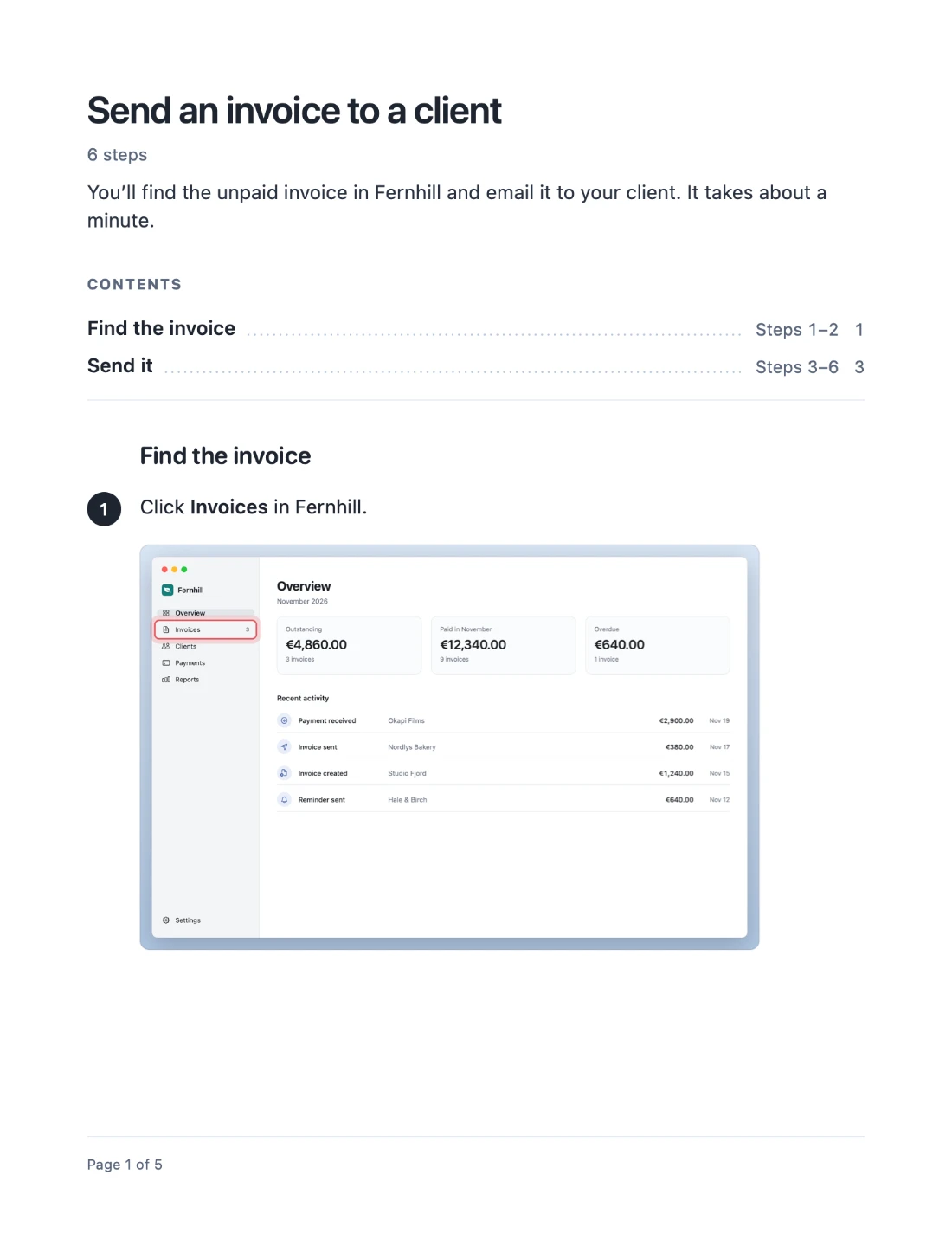
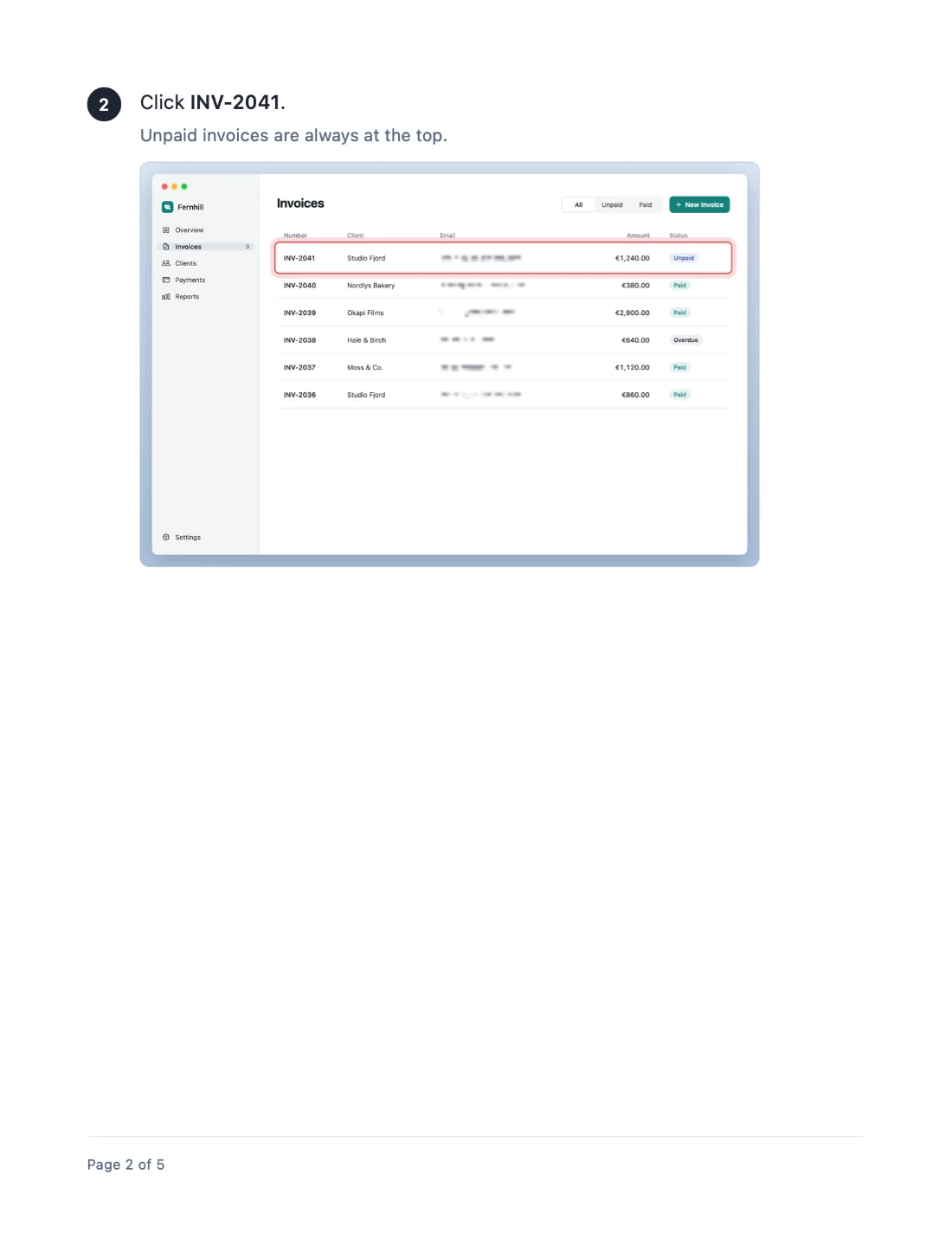
- Press ⌃⇧R and do the task. Each click becomes a numbered step with a screenshot and a ring on what you clicked.
- Steps are written from the button’s own name: “Click Send Invoice.”
- Client emails, phone numbers and card numbers are blurred in every screenshot.
- Long tasks split into sections, like “Find the invoice” and “Send it”.
- Export each procedure as Word to drop into the manual, or as a PDF with a cover and contents to hand out on its own.
PDF, Word or a wiki?
- PDF when the manual goes to people outside your tools, or needs to look the same everywhere.
- Word or Google Docs when several people will edit it.
- Notion or Confluence when the team already lives there. Paste procedures in as rich text or Markdown.
Whichever you pick, keep the procedures as separate pieces. That way you can update one task without touching the rest.
Questions
What should a training manual include?
A short welcome and who’s who, the tools and accounts a new person needs, one procedure per task they’ll do, a first-week checklist, where to get help, and a glossary of your team’s words.
What’s the best program to create a training manual?
Word or Google Docs work well for the document itself. The slow part is the software procedures, with a screenshot for every step. A guide recorder like Stepfinch does those for you on a Mac and exports Word or PDF you can drop into the manual.
Is there a training manual template in Word?
Word has general manual templates, and you can copy the outline on this page into any document. Stepfinch also exports each procedure as a Word file, so it drops into the manual as a section.
Can ChatGPT create a training manual?
It can draft an outline, a welcome and policy sections. It can’t know how your tools are set up, so the step-by-step parts should come from doing the task, not from a prompt.
How long should a training manual be?
As long as the first month of the job needs, and no longer. Keep each procedure to one task, so people can find it and you can update it on its own.