
How to write an SOP that people actually follow
An SOP is a written set of steps for doing a task the same way every time. Here’s how to write one in seven steps, with a real example and a template you can copy.
By Telman Gadimov, who makes Stepfinch · Updated November 22, 2026 · 3 min read
What is an SOP?
SOP stands for standard operating procedure. It’s the written version of “here’s how we do this”: the steps for a task, in order, so anyone can do it the same way. Good SOPs let you hand work to a new hire, an assistant or a client without explaining it again. (How it differs from a work instruction: SOP vs work instructions.)
What goes in an SOP
- Title. The task, starting with a verb: “Send an invoice to a client”.
- Purpose. One sentence on why the task matters.
- Scope. When to use it, and when not to.
- Who does it. The role, not a name, so it survives people leaving.
- The steps. Numbered, one action each. This is the part people read.
- Owner and review date. Who keeps it current, and when they check it next.
How to write an SOP in 7 steps
- Pick a task worth writing down. Start with tasks that repeat, go wrong when rushed, or that you’re about to hand off. “Run payroll” beats “Use the computer”.
- Decide who will read it. A new hire needs more context than a colleague who’s done it once. Write for the least experienced person who’ll use it.
- Do the task once and capture every step. Don’t write from memory. You’ll skip the steps that feel obvious to you and are exactly where a new person gets stuck. Recording the task as you do it is the fastest way to catch them all.
- Write each step as one action. Start with the verb and use the exact words on the screen: “Click Send Invoice.” Not “The invoice should then be sent using the appropriate button.”
- Add a screenshot to every step and point at the click. A ring, a box or an arrow on the button saves a paragraph of describing where it is.
- Take out private info. Blur client emails, phone numbers, card numbers and account numbers before the SOP leaves your hands.
- Test it on someone new. Watch them follow it without help. Wherever they hesitate, add a note or a step. Then set an owner and a review date.
An SOP example
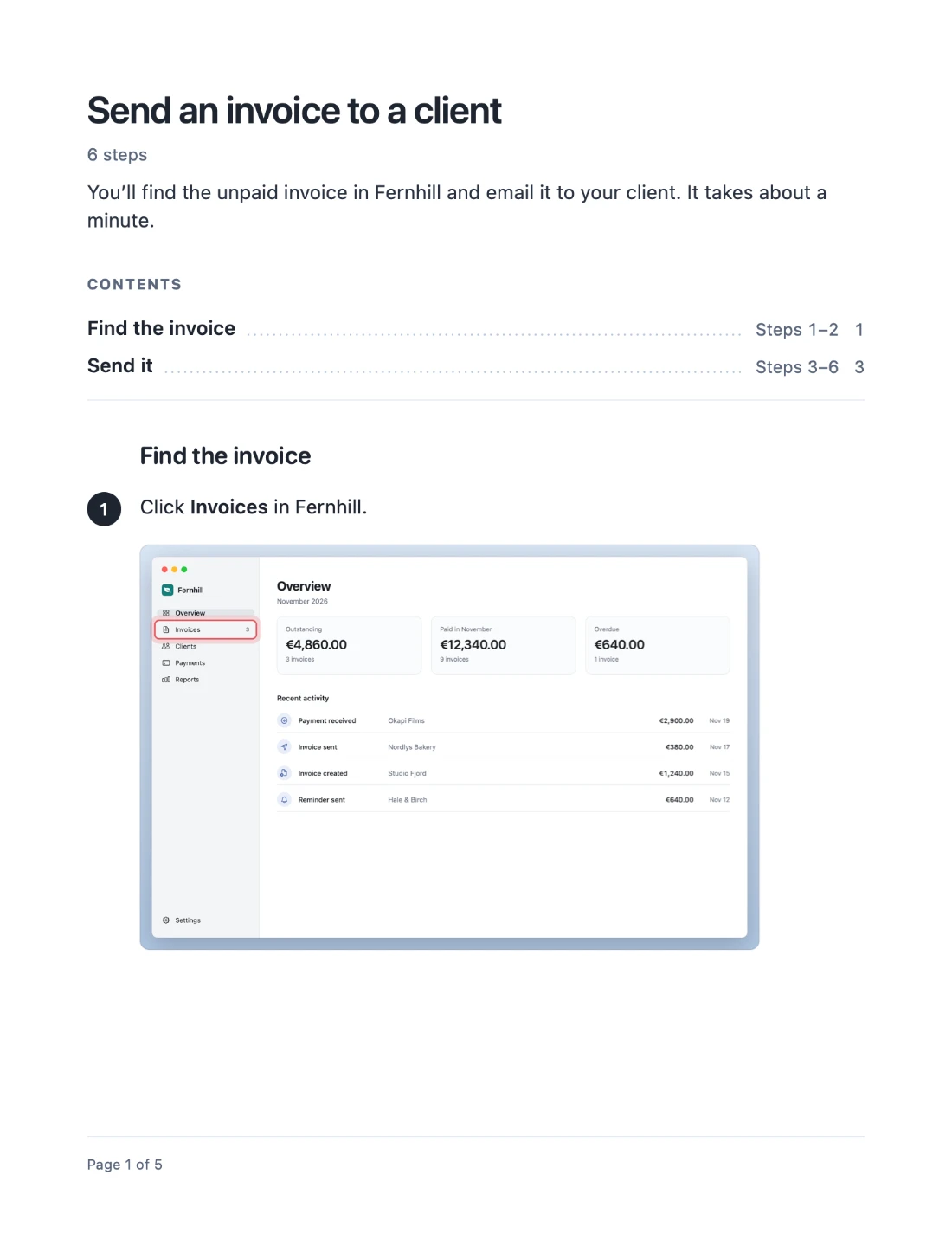
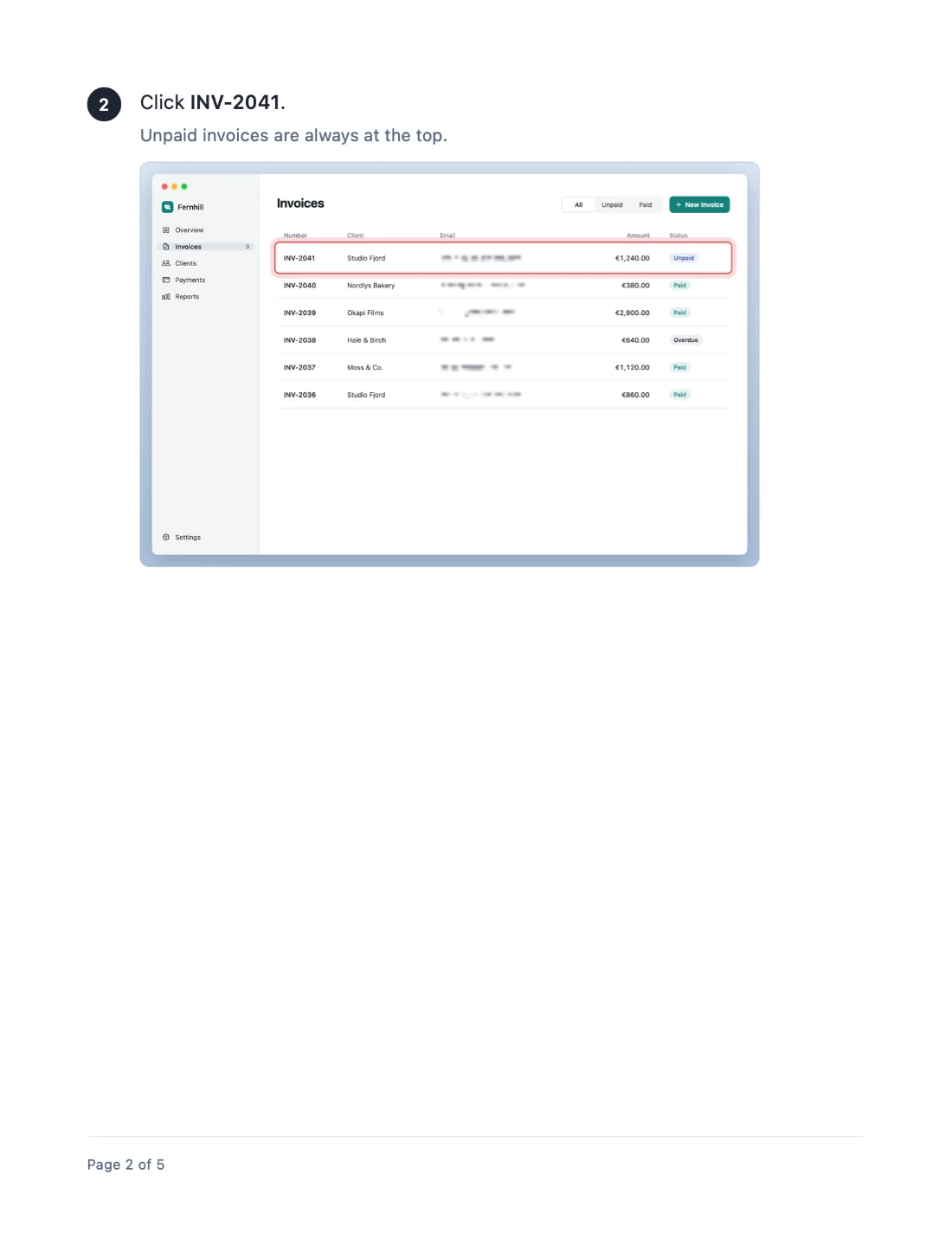
This is a short SOP recorded in Stepfinch, in a made-up invoicing app. Each step came from one click, and the text was written from the name of what was clicked.
Send an invoice to a client
Find the invoice
- Click Invoices in Fernhill.
- Click INV-2041. Unpaid invoices are always at the top.
Send it
- Click Send.
- Type the email address in the To field.
- Check the total, €1,240.00, before you send it.
- Click Send Invoice.
Notice what it leaves out: the client’s email address. Step 4 says “the email address” instead of quoting it, and the screenshots blur it. Step 5 was added by hand, because the check isn’t a click but it matters.
An SOP template you can copy
Title:          [Verb + task, e.g. "Send an invoice to a client"]
Purpose:        [Why this task matters, one sentence]
Scope:          [When to use this SOP, and when not to]
Done by:        [Role]
You'll need:    [Apps, logins, files]

Steps
  Part 1: [Name of the first part]
    1. [Verb + exact on-screen words, e.g. "Click Invoices."]
       [Screenshot, with the click marked]
    2. ...
  Part 2: [Name of the next part]
    3. ...

If something goes wrong:  [Common problems and what to do]
Owner:          [Role]
Last reviewed:  [Date]     Next review: [Date]
Pick the right format
- Step-by-step with screenshots for anything done on a computer. This is most SOPs today.
- A checklist for routines the reader already knows, like a month-end close.
- A flowchart when the task branches: “if the client is overseas, do this instead”.
The fast way: record the SOP
Steps 3 to 6 are where the hours go: doing the task, stopping to take a screenshot, cropping it, pasting it, describing the click, blurring a name. Stepfinch does those on your Mac while you work. Press ⌃⇧R, do the task, press Stop, and you have the steps, the screenshots and the blur. Then you add the purpose, the scope and the notes only you know, and export a PDF or a Word file.
Questions
Is there a standard SOP format?
There’s no single standard. Most SOPs have a title, a purpose, a scope, who does it, the numbered steps, and an owner with a review date. For software tasks, numbered steps with a screenshot each work best.
What are the 5 parts of an SOP?
A common list is purpose, scope, responsibilities, procedure and references. In practice the procedure, the numbered steps, is the part people read, so spend most of your time there.
How long should an SOP be?
As short as the task allows. One task per SOP. If it runs past about 20 steps, split it into sections or into two SOPs.
Can ChatGPT write an SOP?
It can draft the structure and the policy parts. For software tasks it hasn’t seen your screens, so it may name buttons that don’t exist. Record the real steps, then use AI to tidy the wording.
How do I keep SOPs up to date?
Give each SOP an owner and a review date. When the software changes, retake only the steps that changed instead of rewriting the whole thing.